


Enterprise customers can now deploy custom MCP servers into their own environment with one command.
Off-the-shelf tools cover a lot of what agents do: reading email, updating tickets, posting to Slack. But the work that sets a business apart runs on internal systems, custom fields, and logic that’s completely independent from any vendor. To unlock that work, enterprise teams are forced to write their own Model Context Protocol (MCP) servers, and then have to run them.
In response, Arcade.dev is launching Enterprise MCP Hosting.
Enterprise MCP Hosting is now broadly available and already used in production by customers including Duracell. With Arcade Deploy, developers can get started with a single command. Their MCP servers run on the Arcade runtime their company already operates, including self-hosted deployments. Every server gets Arcade’s authorization, policy enforcement, and audit logging from its first call.
Why custom MCP servers stall before production
Writing an MCP server can take a developer days. Getting it into production often takes weeks. Each new server needs a host, an identity setup, a way to handle secrets, and usually a handoff to whichever team owns the cluster. Manual deployments break in small ways, and the next server repeats the whole process.
Then a second internal project starts. Someone has to build the auth plumbing and governance for the server, and security has to approve each server on its own, so each new tool waits in another queue and the rollout slows down. A server running on a laptop or in a one-off container sits outside the controls your security team already approved, so security understandably shuts it down.

That work is worth doing right. Custom servers are how agents reach the systems that make your business different, so our goal has been to make them easier to ship. We already solved this for teams on Arcade Cloud, who have been able to deploy custom servers with arcade deploy for a while. Teams running Arcade in their own environment, which is where most of our enterprise customers run it, had no equivalent. This launch closes that gap.
Our experience building optimized tools also informs Tool Patterns and ToolBench, which help developers build their own custom tools. Alongside the Arcade MCP framework, these resources bring our tool-engineering knowledge into the authoring process. Enterprise MCP Hosting builds on that work, giving those servers a deployment and operations layer backed by Arcade’s runtime controls.
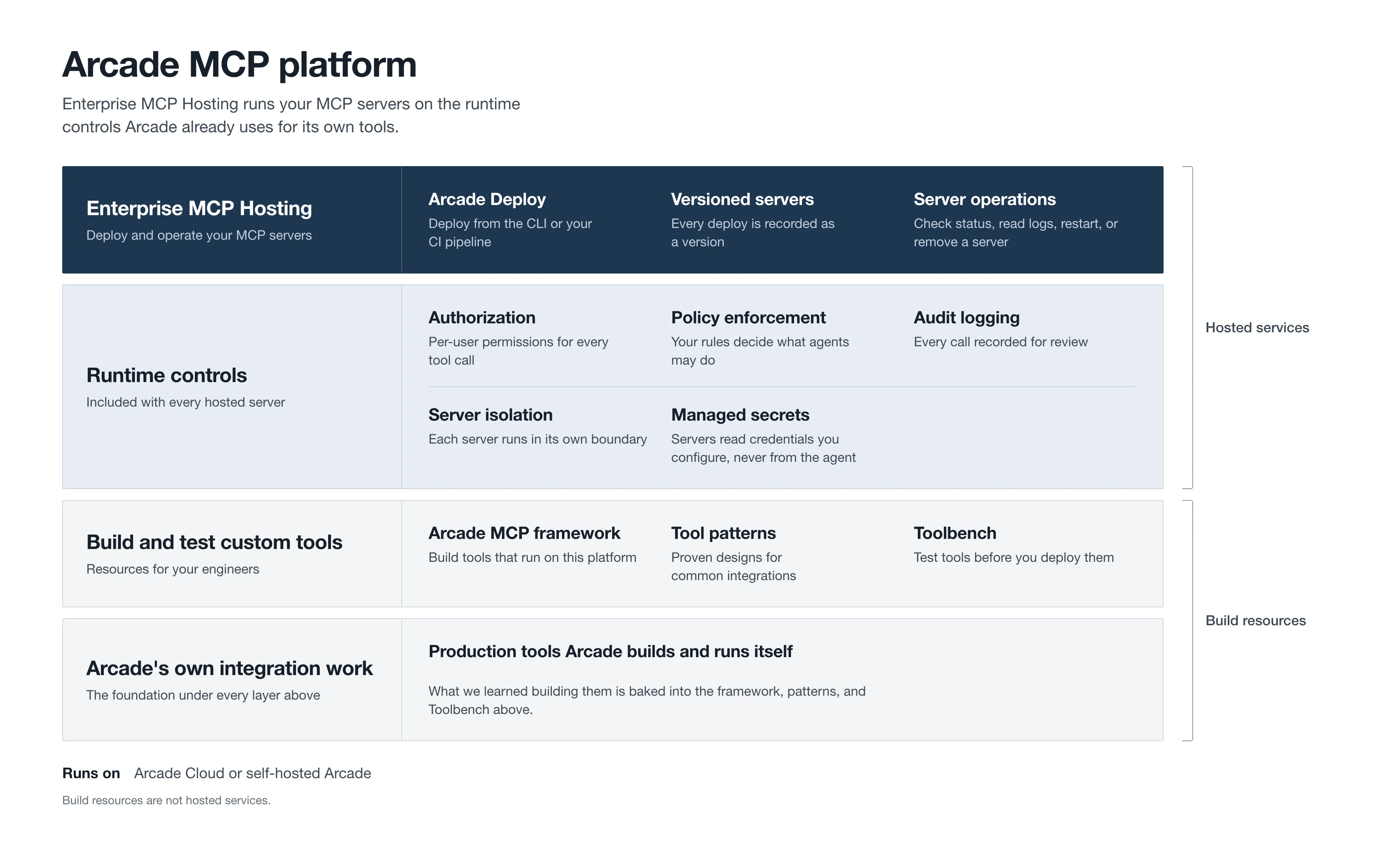
Enterprise MCP Hosting builds on Arcade’s tool engineering, authoring resources, and shared runtime controls.
What enterprises get from Enterprise MCP Hosting
For developers, shipping a custom tool goes from a multi-team project to a single command. They write the business logic, run arcade deploy, and move on, without filing tickets for a host, an identity setup, or cluster access.
For the central AI team, every custom server follows one approved path instead of a growing list of one-offs. Servers run on infrastructure you already operate, within capacity limits your operators set, so a new tool doesn’t add a new system to maintain.
For security, custom tools stop being exceptions. Security approves the enforcement layer once, and every server your teams deploy afterward ships against the same foundation. Each server runs behind the same authorization, policy enforcement, and audit trail as the rest of your agents’ actions.

On self-hosted Arcade, the servers and the data they touch stay inside your environment, which matters most in regulated industries that can’t send internal data to infrastructure they don’t control.
How Enterprise MCP Hosting works
A developer runs arcade deploy from a local checkout or from a continuous integration (CI) pipeline. Arcade packages the server, runs it, and exposes it through your organization’s Arcade gateway. On a self-hosted install, the server runs inside your own cluster, and the developer doesn’t need cluster access to put it there. Enterprise MCP Hosting comes with the Arcade install, so there’s nothing extra to set up.
Once the server is running, Arcade treats it like any other tool. Authorization runs at the intersection of what the user can do and what the agent can do, evaluated on each action against your identity provider (IdP). The runtime hooks that apply your existing security policies to agent actions apply to this server too, and its calls land in the same audit logs as the rest of your agents’ activity.
We also tightened how deployed servers handle credentials. On self-hosted Arcade, your operators decide which secrets each server receives. On Arcade Cloud, deployed servers no longer receive Arcade’s static internal secrets. Each server runs in isolation, so one faulty server can’t take down its neighbors.

Day-to-day operation lives in the dashboard. You get versioned releases, status and logs on each project’s Servers page, restart and removal, and deployment limits your operators set per organization and per project. When a team hits its limit, the error says so plainly.
How to deploy your first server
Enterprise MCP Hosting supports Python servers built with the Arcade MCP framework. We’re adding support for more frameworks next, starting with FastMCP.
If you run Arcade in your own environment, Enterprise MCP Hosting is part of your install. If you’re on Arcade Cloud, it’s already available. The deployment guide walks through your first Arcade deploy, and your account team can help you set deployment limits for your organization.
If you’ve already built an MCP server and found that writing its auth was harder than writing the tool, talk to us.


